
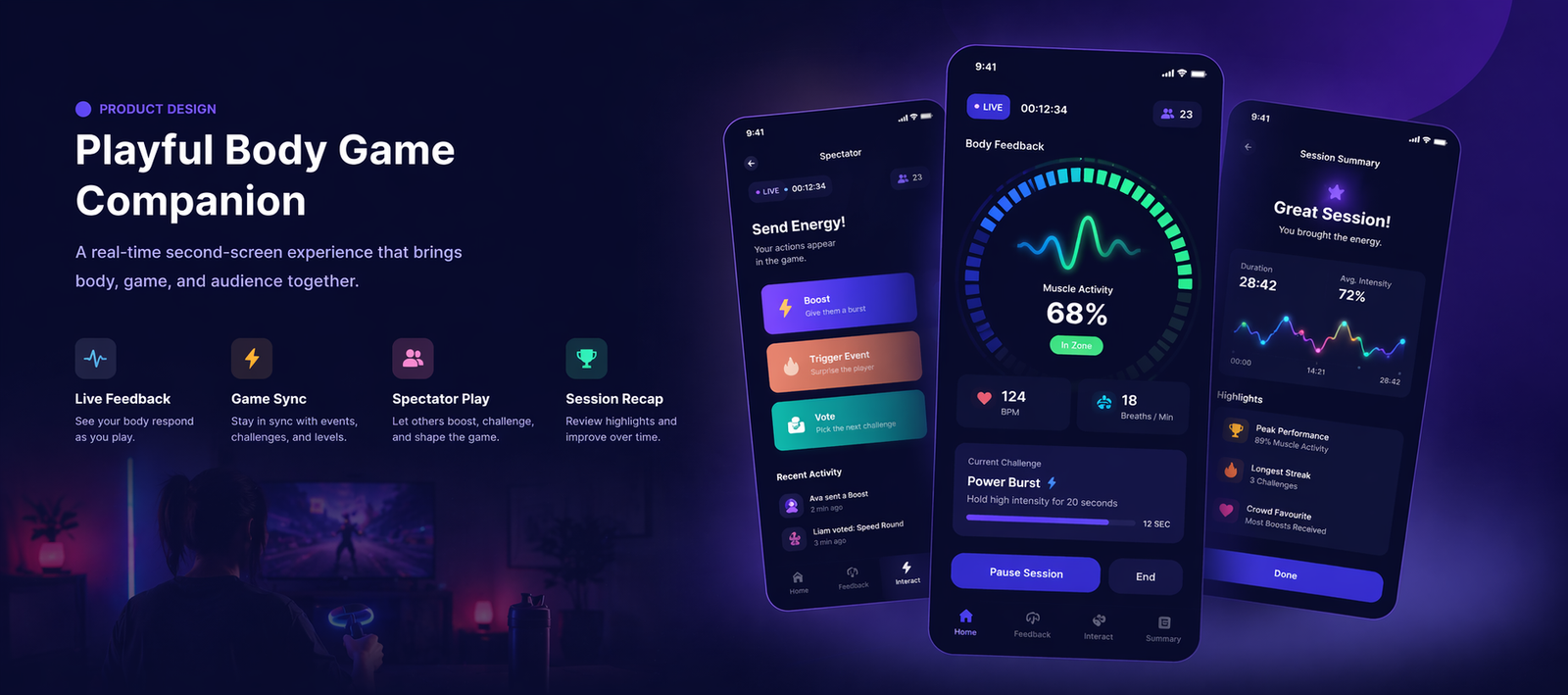
Playful Body Game Companion Mobile App
The Problem
In body-based games, important information is often distributed across multiple layers: the player’s physical state, the game system’s current event, and the reactions or interventions of other people. The main screen usually prioritises gameplay, leaving little room to surface body signals, secondary interactions, or session-wide context.
The challenge was to design a companion experience that makes bodily play more legible without overwhelming the player or turning the app into a generic dashboard.
My Approach
I framed the product as a second-screen system that bridges body, game, and audience. Rather than building a pure analytics tool, I focused on live use during play and on supporting different roles: player, spectator, and facilitator.
Core experience: Connect → Play → Monitor → Interact → Review
The design was guided by three principles: make live body feedback readable, synchronise the app tightly with game events, and enable lightweight interaction that supports play rather than distracts from it.
The Work
The app includes onboarding, connection and pairing, a live session dashboard, body feedback views, synced gameplay status, spectator controls, active challenge states, session summaries, history, and settings. Together, these screens create a companion layer that surfaces invisible body states and supports coordinated interaction around the game.
The UI uses a dark, gaming-inspired visual language with high-contrast signal states, layered data cards, clear action buttons, and compact live feedback modules. This keeps the experience playful and energetic while remaining product-like and easy to scan during active use.
Evidence of Impact
This is a concept project, so impact is framed through product intent. The design aims to make bodily game states easier to understand in real time, create a stronger bridge between experimental interaction and consumer UX, and support shared experiences between players, facilitators, and spectators.
The key shift was from isolated gameplay on a primary screen to a coordinated second-screen ecosystem that makes body, game, and audience visible to each other.
View live project ↗
What I'd Do Differently
Next, I would test the design in live play sessions, compare player versus spectator needs more directly, validate which body signals are most useful during gameplay, and explore how the companion experience changes across different formats such as EMS play, breathing games, and VR sessions.